บทความ

Can see through the rainbow

เป็นไปได้ที่เราสามารถมองทะลุสายรุ้ง จ้องมองที่สายร้อง สักพักสายรุ้งจะหายไป ใครอธิบายได้   Staring at the rainbow And look deep Then it will disappear for a while. You can see though the rainbow .

ลืมรหัสผ่าน Deep Freeze Password Lost

1. Copy file "Persi0.sys" from known Deep freeze password PC จากเครื่องที่เราจำรหัสผ่านได้ 2. Boot เครื่องที่เราจำรหัสผ่านไม่ได้ ด้วย แผ่น Hiren Boot ด้วย Windows MiniXP 3. Overwrite  file "Persi0.sys" to  เครื่องที่เราจำรหัสผ่านไม่ได้  Reboot ใส่รหัสผ่านใช้งานได้เลย

phpmyadmin - error cannot start session without errors please..

ubuntu phpmyadmin - error cannot start session without errors please check errors given in your php... Solved : I had this problem in lucid. My problem was that in /etc/php5/apache2/php.ini the line with: Code: ;session.save_path = "/tmp" was commented out so PHP was defaulting somewhere else maybe. I just uncommented it and restarted apache2 and it worked. thanks for  http://ubuntuforums.org/showthread.php?t=1408389

LightSquid 1.7+Ubuntu 12.04+Krucomchan1.2

ใช้ Light squid 1.7.1  Download   สไตล์บ้าน ๆ 1. Copy  lightsquid-1.7.1.tgz  to /var/www 2. tar -zxvf lightsquid-1.7.1.tgz 3. ใช้ Fillzilla copy lightsquid1.7 to Client PC 4. mkdir /var/www/lightsquid 5. copy all files from lightsquid1.7 from client PC to /var/www/lightsquid    5.1  chown -R www-data:www-data lightsquid 6. cd /var/www/lightsquid then      ตั้งค่าให้ script ทำงานได้       # chmod +x *.cgi       # chmod +x *.pl 7. nano /var/www/lightsquid/ lightsquid.cfg    $cfgpath             ="/var/www/lightsquid";  $tplpath             ="/var/www/lightsquid/tpl";  $langpath            ="/var/www/lightsqui/lang";  $reportpath          ="/var/www/ligh...

Print Screen User Account control Windows 7

1) Run gpedit.msc 2) Under Computer Configuration\Windows Settings\Security Settings\Local Policies\SecurityOptions: Change “User Account Control: Switch to the secure desktop when prompting for elevation” to disabled

Error Install SQL Server 2005

SQL Native Client : setup Failed SQL Server Database servies : Setup Failed Workstation components, books online : Setup Failed แก้ไข 1. Extract SQLEXPR_AVD 2. Go to Setup Folder and sqlncli.exe to uninstall 3. Reboot 4. setup.exe

Adobe Flash Player Offline

Click This link http://www.adobe.com/products/flashplayer/distribution3.html

Copy Audio CD in Ubuntu

Copy Audio CD, file was convert to WAV automatically.

Gallery3 restore mysqldump and var to new server

1. export database *.sql 2. backup /var/www/gallery3/var Restore 1. create database (gallery3) 2. copy gallery3.sql to /var/lib/mysql 3. restore gallery3.slq >>           1. mysql -u root -p gallery3 < gallery3.sql     2. enter mysql root password     3. copy /var/www/gallery3/var to newserver     4. correct /var/www/gallery3/var/database.php     5. OK

เปิดโน๊ตบุคเครื่องบูตปกติแต่จอไม่ติด

รูปภาพ
นี่อาจเป็นสาเหตุหนึ่ง คือต่อจอออกโปรเจกเตอร์ หรือ จอ LCD อื่น ๆ โดยกด Windows + P แล้วเลือกอันสุดท้าย คือ Projector only ไว้ แล้วไม่ได้เปลี่ยนกลับคืนก่อน Shutdown พอเปิดมาอีกที จอโน็ตบุคก็เลยไม่ติด ต้อง กด Windows + p ซ้ำ สัก 2 ครั้ง จอก็จะติด

No Samsung Apps on Kies [Fixed]

1)  Open up start and in the search write ''run''. - Then, allow the program and afterwards in the free space write ''regedit'' without ''. - Click Computer to get a list of folders - Click HKEY_CURRENT_USER to get a list of more folders - Click Software to get even more folders - Click on Samsung, then Kies 2.0. - A window to the right will appear, with list of REG_SZ+ files - Right Click on Region -> Modify - Set the Region value to GB

ลำดับบทความจูมลา : Joomla 2.5 Featured Articles Not Sorting Properly

1.  Access your Article Manager Options Article Manager options is where you manage all the global options of your articles and categories.  These options are applied to all articles and categories created in your Joomla site if the attribute was not otherwise set in the menu or category.  By default, new menus and categories use the global settings in the Article Manager Options. Login to your  Joomla 2.5  Administrator backend Click on ‘Content’,  ‘Article Manager’ Click on the ‘Options’ button on the top right 2.  Change the Category Order in Shared Options In the ‘Article Manager Options’ window, switch to the ‘Shared Options’ tab Set the following value: Category Order = No Order Click on ‘Save & Close’

เมนูย่อยโปร่งใส, Transparent artisteer submenu

รูปภาพ
แก้ไขไฟล์ template.css /* begin MenuSubItem */  .love-menu ul a  {  display: block;  white-space: nowrap;  height: 26px;  width: 180px;  overflow: hidden;  background-image: url('images/subitem.png');  /* for IE */  filter:alpha(opacity=60);   opacity:0.8;          background-position: left top;  background-repeat: repeat-x;  border-width: 0;  border-style: solid;  text-align: left;  text-indent: 12px;  text-decoration: none;  line-height: 26px;  color: #999;  margin:0;  padding:0;  }

Enable Joomla 2.5 Top drop down submenu

1. Login to backend 2. Menu manager 3. Modules Linked to the menu 4. Select > Show sub-menu items > Yes 5. Save&Close

มหัศจรรย์ดอกพุด

  เช้าวันนี้เป็นวันพระ ปกติเก็บดอกพุดทุกวัน เพื่อให้นักเรียนซ้อมทำพาน (ดอกตูมกำลังพอดีสำหรับร้อยมาลัย) ตั้งแต่เช้าตรู่ทุกวัน เมื่ือวานดอกตูมใหญ่เยอะมาก แต่มาเช้าวันนี้เป็นที่อัศจรรย์ ไม่มีดอกตูมใหญ่เลย มีแต่เล็ก ๆ ทั้ง 20 ต้นเลย น่าแปลกมาก

Remove iframe wrapper border joomla

/modules/mod_wrapper/tmpl/default.php    ใส่  frameborder = "0"    ก่อน class="wrapper   

เปลี่ยนโน้ตบุ๊กให้กลายเป็นเราเตอร์ไร้สาย

รูปภาพ
Wifi Router Notebook 1.ต้องต่ออินเทอร์เน็ตในโน้ตบุ๊กที่ต้องการทำเป็น Virutal Wi-Fi แล้ว เปิด Notepad พิมพ์คำสั่ง netsh wlan set hostednetwork mode=allow ssid=ชื่อเน็ตเวิร์ก key=พาสเวิร์ด netsh wlan start hostednetwork โดยระบบจะให้บริการในการเชื่อมต่อ เข้ารหัสด้วย WPA2 จากนั้นเซฟไฟล์เป็น นามสกุล.cmd 2.เสร็จเรียบร้อย ให้คลิกขวาบนไฟล์ *.cmd เลือกคำสั่ง Run as administrator 3.ตรวจสอบการเชื่อมต่อเครือข่ายด้วย Virtual Wi-Fi ได้จากใน Wireless Network Connection ใน Network Connections of Network and Internet โดยจะแสดงชื่อบริการที่ตั้งไว้ เพียงแค่นี้ก็สามารถเปลี่ยนโน้ตบุ๊กที่ใช้ให้เป็นเราเตอร์ไร้สายได้ สำหรับการแชร์อินเทอร์เน็ตหรือมือถือและโน้ตบุ๊กเครื่องอื่นๆ ได้แล้ว

remove saved network passwords windows 7

รูปภาพ
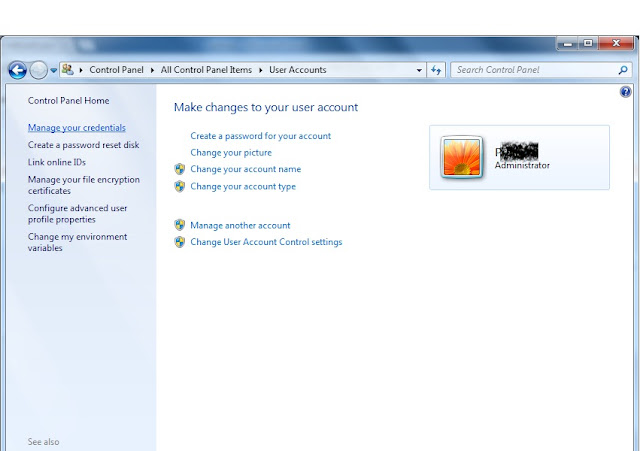
วิธีการลบชื่อและรหัสที่เราให้เครื่องจำไว้ในเครื่อง Windows 7 1. ไปที่ Control Panel 2. User Accounts   3. คลิกที่ Manage your credentials 4. จัดการลบ Username และ password  5. หรือจะเพิ่ม Network, Username, password ใหม่ก็ได้

ลบรหัสผ่านเครือข่ายที่ saved ไว้

รูปภาพ
Remove Saved Networks Passwords สำหรับ WindowsXP 1. Run คำสั่ง "rundll32.exe keymgr.dll, KRShowKeyMgr" 2. หน้าต่างจัดการจะเด้งขึ้น แล้วก็ Remove เลย 3. หรือจะกด Add เพิ่มใหม่ก็ได้  สำหรับ Windows 7 คลิดอ่านนี่

Folder Permission Joomla 1.7

รูปภาพ
- as result, all directories should be "Writable": administrator/components - Writable administrator/language - Writable administrator/language/en-GB - Writable administrator/language/overrides - Writable administrator/manifests/files - Writable administrator/manifests/libraries - Writable administrator/manifests/packages - Writable administrator/modules - Writable administrator/templates - Writable components - Writable images - Writable images/banners - Writable images/sampledata - Writable images/stories - Writable language - Writable language/en-GB - Writable language/overrides - Writable libraries - Writable media - Writable modules - Writable plugins - Writable plugins/authentication - Writable plugins/content - Writable plugins/editors - Writable plugins/editors-xtd - Writable plugins/extension - Writable plugins/search - Writable plugins/system - Writable plugins/user - Writable templates - Writable con...